Filter modifier functions
Filter modifier functions in DAX are functions that alter or override the filters applied to measures or calculations — typically used inside CALCULATE() to control what data context a calculation should run under.
Here are few of the most widely used ones.
FILTERS
This function returns the filters currently applied to a column or table. It’s often used to understand which values are being filtered in a calculation or visual.
FILTERS(Sales[Region])
If a user selects “East” and “West” in a slicer for Region, this function will return a table containing those two regions.
ALL
The ALL function removes all filters from a specified table or column. It’s typically used when you want to ignore the current filter context — for example, to calculate totals, percentages, or comparisons across the entire dataset.
Total Sales All = CALCULATE(SUM(Sales[Amount]), ALL(Sales[Region]))
Ignores the Region filter and calculates total sales across all regions.
ALLSELECTED
Removes filters applied within a visual but keeps filters from slicers or report-level filters.
Sales % of Total = DIVIDE( SUM(Sales[Amount]), CALCULATE(SUM(Sales[Amount]), ALLSELECTED(Sales[Region])))
If a slicer filters two regions, the measure calculates the % of total within those selected regions only.
KEEPFILTERS
KEEPFILTERS maintains the filters applied on visuals, also adding any new filters specified in the CALCULATE function, ensuring they complement rather than override the existing context.
Filtered Sales =CALCULATE( SUM(Sales[Amount]), KEEPFILTERS(Sales[Category] = "Electronics"))
Applies the Electronics filter along with any existing filters.
SELECTEDVALUE
Returns the value when only one value is selected; otherwise returns blank or a specified alternate value.
Selected Region = SELECTEDVALUE(Sales[Region], "Multiple Regions")
Shows the selected region name or “Multiple Regions” if more than one is selected.
REMOVEFILTERS
Clears filters from specific columns or tables, similar to ALL, but more explicit and readable.
Total Sales = CALCULATE(SUM(Sales[Amount]), REMOVEFILTERS(Sales[Region]))
Removes filters from Region but keeps other filters intact.
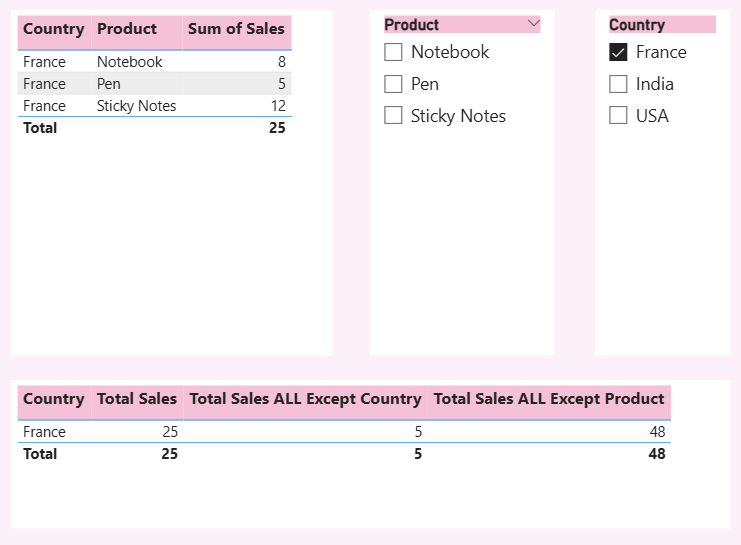
ALLEXCEPT
Removes all filters except those applied to specified columns.
Sales by Region =CALCULATE( SUM(Sales[Amount]), ALLEXCEPT(Sales, Sales[Region]))
Keeps filters on Region but removes all other filters (like Product or Date).